June 20th, 2026
Ledenbeheer
🎯 Redesigned offerings management in Ledenbeheer 2.0
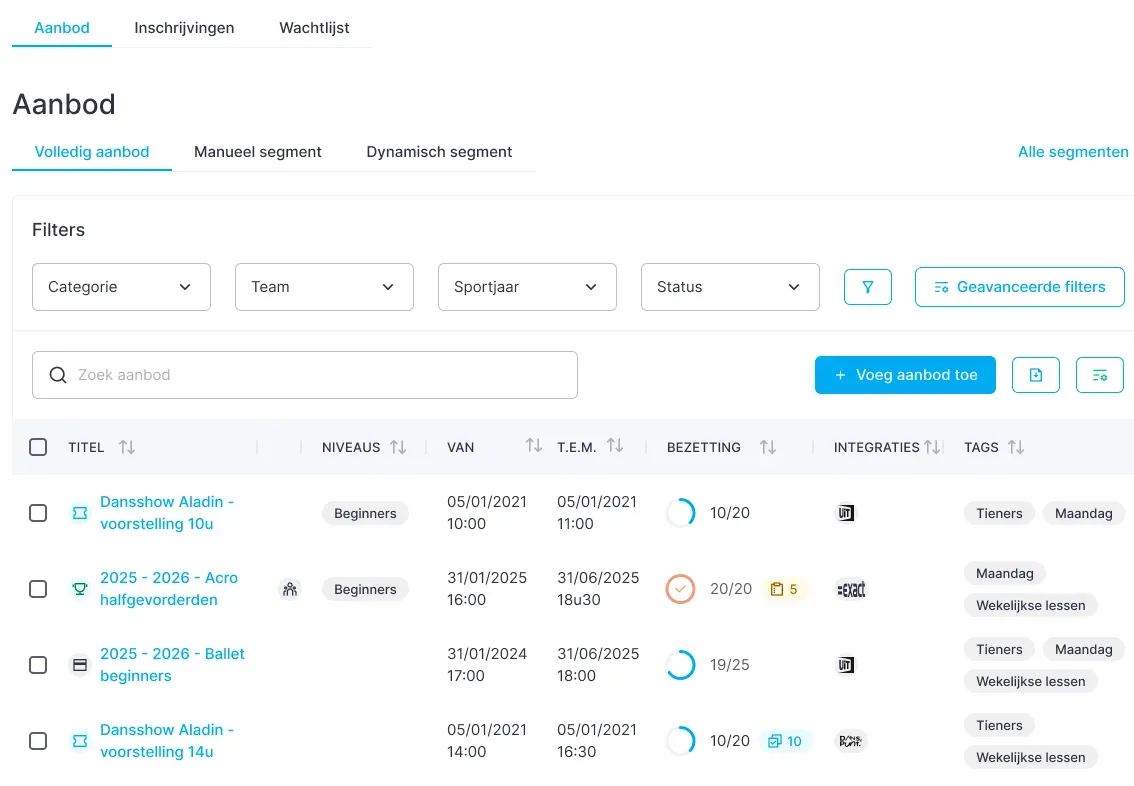
Behind the scenes, we are working on a completely redesigned way to manage your offerings. The goal? Fewer clicks, a clearer overview, and faster workflows.
Here is a first look at what you can expect.
All offerings in one central location
Today, different types of offerings are still managed through separate menus. The new version brings everything together in one central overview.
Weekly classes, ticket sales, activities, and additional services are managed from the same page. This gives you a complete overview of everything your organization offers without constantly switching between screens.
Smart filtering and reusable filters
Even though everything is brought together on one page, extensive filtering options keep the overview clear.
Do you often work with the same selection? Save your filters as a segment. With one click, you can open views such as:
Weekly classes only
Activities from the current sports year
Fully booked offerings
Offerings for a specific target group
This saves time and makes daily follow-up much easier.
Integrations visible immediately
The new overview instantly shows which integrations are connected to each offering.
You can check at a glance whether everything is configured correctly without opening every offering separately.
More structure with tags
Tags will play a more prominent role in managing offerings.
Use them to group offerings logically and find them faster—for example by age group, class day, location, or category.
Bulk actions without detours
Bulk editing becomes much more intuitive.
Instead of navigating to a separate menu, simply select the required items using the checkboxes in the overview. You can then perform actions on all selected items at once.
Faster, simpler, and with fewer clicks.
A more modern user experience
In addition to the new features, offerings management gets a completely redesigned interface. A clearer overview, better search, more informative indicators, and a consistent user experience help you find what you need faster and work more efficiently.
This is just one of the many improvements included in Ledenbeheer 2.0. We look forward to sharing more of the new features we are currently building.